
How to Use Waitlisting During Registration
Waitlisting allows you to get ‘in line’ for courses that are full. This feature sends an automated notification to your WCTC email when a spot opens up and it is now your turn to register for the class.
Identifying if a Course Has a Waitlist
- Log into MyWCTC and select Register for Classes.
- Select a term and click continue.
- Search for a course.
- Full courses are identified by the red exclamation point.
- Courses with a waitlist will have a blue triangle and list how many waitlist seats remain.

Adding Yourself to a Waitlist
- Once you have identified the waitlist you want to add yourself to, select Add.

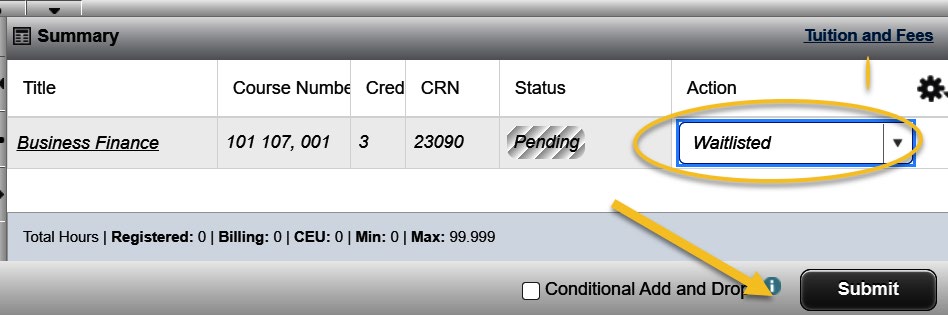
- In the Summary section, select Waitlisted and click Submit.
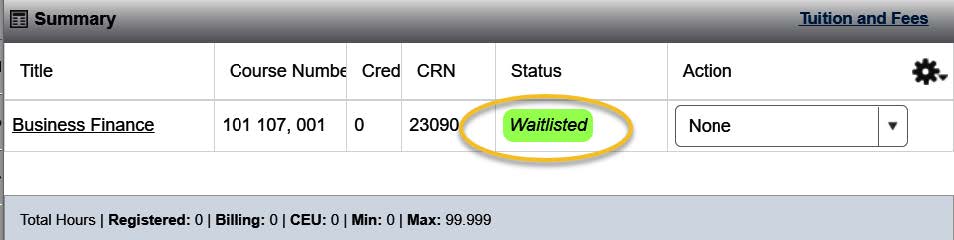
- Your status will then update to Waitlisted.
Email Notifications
When a seat becomes available in a waitlisted class, a notification is automatically sent to your WCTC student email. This email notifies you of an open seat and that you need to register for the class within 72 hours of the time the email was sent.
NOTE: The week before the term begins the timeframe will reduce to 24 hours.
Registering yourself from a waitlist
- Log into MyWCTC and select Register for Classes
- Select a term and click continue
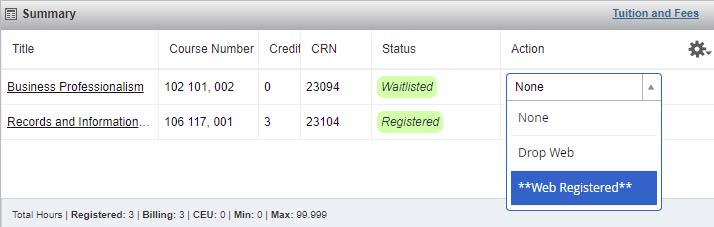
- In the summary pane, update the Action to Web Registered and click Submit. Your status will update to Registered.
Tips
- You can waitlist yourself in multiple courses.
- While on a waitlist, you must check your WCTC email often.
- Being on a waitlist does not guarantee registration for the class. It is recommended that you register for an alternate class in case the course never becomes available to you.
- If you do not register by the deadline date and time, you will be removed from the waitlist and the available seat will be given to the next student on the list.
- To get back on a waitlist you must re-register for the course’s Waitlist.
- Waitlisting will be available until 4 p.m. the Thursday before the term start.
- Beginning at 4 p.m. the Friday before the term start. All waitlists will be purged and registration for open spots will be on a first-come, first-serve basis until the course start.